



EKLEVA 4K Wireless Carplay Car DVR Dashcam Android Auto WiFi Dash Cam Navigation Rear View Camera Mirror Video Recorder HD 1080P
The dash cam uses two wide-angle cameras installed inside and outside the vehicle to capture images of the surrounding area and transmit them to the integrated device in real-time. With the help of this system, the driver can see the obstacles and pedestrians around the vehicle intuitively, and effectively reduce the occurrence of scrapping, collision, collapse, and other accidents. This product can record all driving pictures to avoid " scrapping porcelain " disputes.
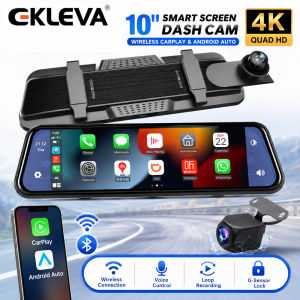
As shown in the figure above, click the [ Apple CarPlay] button to enter the wireless AppleCarPlay and wireless Android Auto selection, click the [Bluetooth Management] option of the interface, and connect to Bluetooth with the mobile phone, you can open the application. When the machine is powered on, it will try to automatically connect to the last connected phone.
(The AppleCarplay option only supports iPhones, Turn off the phone WiFi button to disconnect)
Turn on the Wi-Fi and Bluetooth of the mobile phone first, then select the [Wireless Android Auto] option, click the [BT Manage] option of the interface, connect Bluetooth with the phone, can open the application.
(Wireless Android Auto option only supports Android phones, turn off the WiFi button to disconnect)
Locate the drilling hole, find the appropriate installation position in the license plate attachment, mark it with a pen and then drill the appropriate size of the screw hole. Fix the camera to the rear of the car with screws, the reversing trigger wire (red thin wire) needs to be connected to the positive pole of the reversing light, and finally, use the camera extension cable to connect to the monitor.
As a result of the use of advanced WDR technology, which will translate into high definition, low-distortion of color for dash cam through adjusting exposure balance image and affinity.
1 Setting: Set system functions


2 Apple CarPlay: Special connector for iPhone


3 Android Auto: Special connection machine for Android mobile phone


4 Dashcam: Click to enter the video recording interface


5 FM Transmitter: When turned on, the device will transmit the sound to the original vehicle


6 Bluetooth: Click to enter the Bluetooth connection interface and play Bluetooth music


7 Volume button: Click to adjust the volume


8 Time and Date: Displays the current time and date


9 Brightness button: Click to adjust screen brightness

ekleva Official Store
Review
You May Also Like
Proton Wiper Persona / Iriz 2016-2022 OEM Wiper Blade Japan Technology
Nmax v1 Sen Lights Turn Signal Nmax Sen Nmax Old Front Led Variations Plus Dusk Blue Red White
Aitemay Car Vacuum Magnetic Suction Cup Phone Holder Universal Double Layer Magnetic Force 360° Swivel Holder
![DDPAI N5 Dual Front & Rear [4K UHD Resolution I AI Motion Detection I Build-In GPS Log I Night Vision I Build in 32GB ]](https://img.lazcdn.com/g/ff/kf/S071d23d13f844d7fa56f0e6c6ca42e29d.jpg_300x300q80.jpg)
DDPAI N5 Dual Front & Rear [4K UHD Resolution I AI Motion Detection I Build-In GPS Log I Night Vision I Build in 32GB ]

Ready Stock Car sticker PE film Cover Stripe Car Door Center 125 Brook Column Pillar sticker Car Window Middle

WOLFBOX G890 12" 3 Channel Rear View Mirror Camera 2K Triple Mirror Dash Cam 4K UHD Dash Cam Mirror Front and Rear with Hardwire Kit Touch Screen Backup Camera with Motion Detection GPS&64GB CardCar Camera
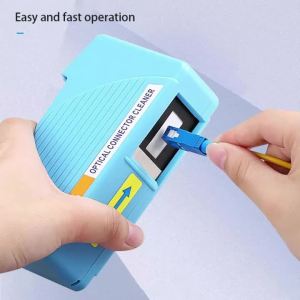
Fiber Optic Lint Free Wipes Dry Wet Dual Use Dustless Non-Woven Paper for MPO FC SC ST LC Bare Connector End Face Cleaning

Demon Eye Solar LED Car Ambient Light Wireless Suction Cup USB Rechargeable Breathing Atmosphere Lamp

🔥READY STOCK🔥KENDODCHI 2Pcs 9005 LED Car Headlight FOR PROTON SATRIA NEO(2006-2013) product by Malaysia
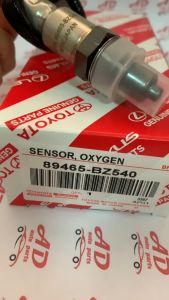
Toyota OXYGEN SENSOR 4 PIN 89465-BZ540 Daihatsu PERODUA AXIA BEZZA NEW MYVI 1.3 REAR FRONT OXI PECUT OKSIGEN LAMBD
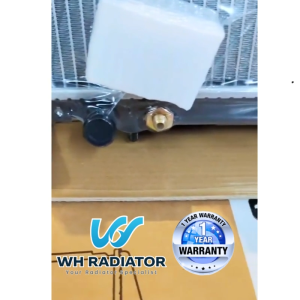
PERODUA KELISA / KENARI TURBO (26MM)Double Layer TOP QUALITY AUTO/MANUAL Radiator Tangki Air
![Toyota Estima 2000-2005 ADV Magnetic Sunshade [6PCS]](https://img.lazcdn.com/g/ff/kf/S985cdca4ccc140c89e9cdd27ad126ba4a.jpg_300x300q80.jpg)










