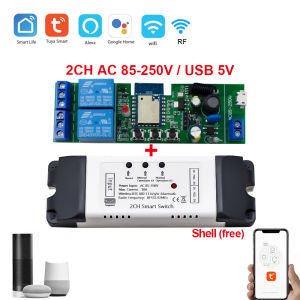
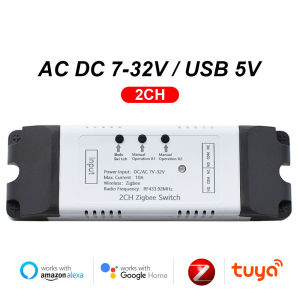
2 Channel Zigbee Smart Wifi Electric Actuator Motor ControllerDC AC 12V 24V SwitchRF433 Remote2CH Pulse Relay Module
NOTE1.The package only have 2 channel relay,it don't include the Electric Actuator Motor2.It can't control the motor speed.it only can control the motor forward and reverse.3.If you need to make the RF433 Remote controller work with the relay,you need to add the RF433 remote controller in the app firstlyTuya Zigbee eWelink Wifi Smart Switch Electric Actuator Motor Controller,DC AC 12V 24V RF433,2CH Pulse Module RelayIt can't control the motor speed.Attention! Attention! Attention!Three types of TUYA/ZIGBEE/EWELINK brand motor controllersUse for Tuya Motor Controller1.Remotely give a pulse signal to turn on or turn off Lights,Lamps,pc and other home appliance.2.Remotelygive a pulse signal to turn on or turn off Garage Door,Door Access,Sliding Door.3.Remotely give a pulse signal to control DC Motor,AC Motor to Forward and reverse,such as motorZigbee Motor Controllerewelink Motor ControllerOverview:3 Working Mode:1.Self-locking : Each channel could be switched on/off seperately.You can turn on/turn off all channel at the same time.2.Interlocking mode :Switch on any channel , other channels will be switched off automatically .3.Inching mode : Switch on one channel,the channel will be automatically closed after 0.5seconds .Other channel is same as the channel.If you need to change the mode,you need to change the working mode in app.Features:【Two Input Ports】You could choose USB 5V port or the screw terminal port to supply power in the input to make the pcb board board work.【Dry Contact/Passive Output】 No matter how many power you supply in the input, the output don't have any power voltageIf you do not supply power in output port, the connectted home appliance can't work, you also need to supply power in output.【Timer】The connectted home appliances can be automatically turned on/off according to the time schedule.Each channel can set different time schedule.Different Ways to Control the WIFI Module【APP Remote Control】You can control the connectted home appliance in Tuya or smart life APP anywhere and anytime.Such as light, electric kettle, electric rice cooker, electric curtain, etc.【RF433 Control】The WIFI Module support RF433 Frequency,and you can control the WIFI module by RF433mhz remote controller.【Mobile Phone Control】 When you go outside or at home,you could control the device in your smart phone by 2G/3G/4G Mobile Network or WIFI.(Note:The router need to onlinet.The WIFI module need to keep a close distance with the router and the wifi module need to online in Tuya Smart Life APP)【Voice Control 】Compatible with Alexa and Google Assistant, you can use the voice control to turn it on/off the connectted home appliances . 【Share Control】One device can control by Multiple phones,you can share the wifi module with your family.So your family member also can control the module.【Group Control】one phone can control Multiple smart device.You can add the wifi module and other smart device in a group,and then turn on/off all smart device at the same time.Specification:Maximum current≤ 10AInput 1: Micro USB 5VInput 2 (screw terminal port): :D C/AC 7-32V AC 85-250VNO NC COM Output: Output Signal (Dry Contact)Operating temperature: -20-70°COperating humidity: 40% to 80% RHWIFI standard: 2.4GHz, IEEE 802.11 b/g/n (5G not supported)Size: 1203825mmAPP: Tuya/Smart LifeTimer & Time ScheduleSet time schedules to turn on/off lightsShare ControlShare the device with your family or friends so that they can also control the devices remotelyAPP ControlYou can remote turn on/off household appliances and set timing schedules to turn on/off the household appliances via app Tuya/Smart life anywhere anytime.such as lights, celectric curtains ,electric curtains fans.Voice ControlCompatible with Google Assistant and AlexaVoice control to turn on/off your home applicancesTUYA Controller Operating InstructionseWelink Controller Operating InstructionsZigbee Controller Operating InstructionsHow to pair RF433 remote controller with with the devices.1.Press the RF433 pairing button for 4 seconds,and wait until the blue led indicator turn on.2.press any key of RF433 remote controller, and then you can pair the channel with one key of RF433 remote controller successfullyIf you need to pair other key of the RF433 Remote controller and other channel, you need to repeat the step.How to clear the pairing RF433 remote controller with with the devices.1.Press the RF433 pairing button for15 seconds,and wait until the blue led indicator turn off.If you need to clear the pairing between other key of the RF433 Remote controller and other channel, you need to repeat the step.

GlobalTechMart
Review

You May Also Like

LIGE | LIGE 1.53” HD Screen Smart Watch Men LED Flashlight 1000mAh Large Battery Wireless Call Bracelet Waterproof Fitness Smart watch

Aqara | Aqara Door Window Sensor Zigbee MCCGQ11LM Smart Alarm Work With Xiaomi Home APP Mijia Gateway Homekit Global Version
MOES | MOES Tuya Zigbee/WiFi 1-Phase Smart Power Meter Module Electricity Consumption Monitor 63A Measure Built-in Current Transformer
LIGE | LIGE 2026 New Outdoor Sports Smart Watch Men 1.85“ HD Screen Heart Rate Bluetooth Call IP68 Waterproof Business Smartwatch Men
LED RGB Bulb Light 12/15/18W RGBW Lamp IR Remote Control 2700K-6500K Spotlight Bulb Smart Color Changing LED Lamp Home Bar Decor

LIGE | 2025 GPS Smart Watch Offline Maps 4GB Memory Military Rugged Compass Watch 30M Swimming Waterproof AMOLED Sports Smartwatch Men
Original Samsung Galaxy Fit 3 (R390) Bluetooth Smartwatch with 1 Year Warranty by Samsung Malaysia
RF433Mhz Wireless Remote Control Switch 12V 24V AC 110V 220V Relay Receiver 30A Transmitter for Door Pump Light Fan DIY Module

【双手机刷步数神器 Mobile Step Shaker】 双手机步数器/刷步数器/手机摇步计步器 Mobile Shaker/Phone Shaker

Smart Watch Stylish Ladies Gift Set: A58 Plus Smart Watch with Interchangeable Jewelry Jam Tangan Pintar Hadiah Wanita B

4K AI Smartglasses Anti-shake 1080P HD Video Photochromic Lenses Bluetooth HD Call Translation Conversation 4GB RAM Smartglasses