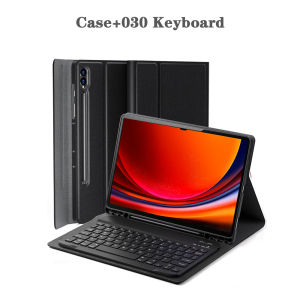
Tablet Case for Samsung Galaxy Tab S8 / S9 / S10 Ultra 14.6 lnchDetachable Keyboard with Pencil Holder and Bluetooth Keyboard
The tablet case in this link is only compatible with models:Samsung Galaxy Tab S8 Ultra 14.6-inch(SM-X900N/X906N)Samsung Galaxy Tab S9 Ultra 14.6-inch(SM-X910/X916B/X918U)Samsung Galaxy Tab S10 Ultra 14.6-inch(2024 Model:SM-X920/X926B/X926N/X920N) How to verify tablet model1. Go to the back and find your specific model.2. Find "Settings" - Click "About" - Find "Model"3. Please purchase the correct compatible model case according to the tablet after viewing.Note:The digital tablet and stylus are not included in the package. The detailed description is for reference only. Please refer to the actual product for the color of the product.1. Connect the mouse first, then the keyboard.2. Mouse: Push the switch to the "Bluetooth" icon and find the Bluetooth connection with the "mouse" in the device Bluetooth list.3. Keyboard: Push the switch in the upper right corner to "ON", press "Connect", and find the Bluetooth connection with "Keyboard" in the device Bluetooth list.4. Touchpad keyboard: Open the keyboard, press Fn+C, and then find the Bluetooth connection with "Keyboard" in the device Bluetooth list.FAQQ:What should I pay attention to when connecting the mouse for the first time?A:When the mouse is connected for the first time, you need to press the left button, the right button and the scroll wheel at the same time for about 3-5 seconds.Q: Is the scroll direction of the mouse USB connector and Bluetooth connection the same?A: No, they are different. When using the USB connector, the scroll wheel slides in the same direction as the computer mouse. Bluetooth connection is the opposite.Q: How to switch between different systems?A: Fn+Q=Android, Fn+W=Windows, Fn+E=IOS.Please note that please switch the system before connecting the tablet.Q:The bluetooth keyboard letters are messy?A: Please check the settings according to the prompts,a. Check whether the keyboard language set on the device is English.b. Disconnect the keyboard Bluetooth, click Ignore the connected device, reopen the Bluetooth keyboard, select system, Fn+E (IOS system).Note: Fn+Q=Android, Fn+W=Windows, Fn+E=IOSc. Press the L S Z buttons at the same time to reset the keyboardQ:How to configure the input method for different languages keyboard?A:Take the samsung tablet as example,open "Settings--"ystem"--"Language & input"--"Add New Keyboard". (For other systems, please set them in the system settings according to the tips of the iPad example.)Q:How does the mouse change teh scroll wheel sliding direction on the device?A: The mouse is connected, open "General" - "Trackpad & Mouse" - close "Natural Scrolling".

GlobalTechMart
Review

You May Also Like

TELESIN Underwater Diving Phone Case Waterproof Case Universal Underwater Photo & Video Diving Housing Handle Grip

Fast delivery 100pcs Anti-Fog Wipes Glasses Lap Cermin Mata Anti Kabus一次性防霧眼镜湿巾

Oneplus 12 / 11 5G / 10 Pro 5G / 8 / Oneplus 8 Pro 3D Curve Nano Liquid Glue UV Tempered Glass Screen Protector

Insta360 Go Ultra hello kitty TPU Clear Protective Case With Anti-lost Rope Transparent Body Cover Full Coverage Scratch-proof Lens Cap
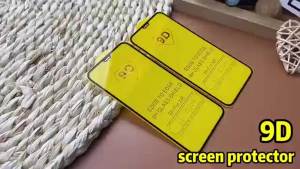
3PCS 9D Screen Protector For Xiaomi Poco X7 Pro F7 F8 Ultra X8 Pro Max F6 X6 M7 M6 X3 C75 C71 C65 C61 X5 X4 M5 M4 C55 C40 Glass

PsDs Honor Pad X8A 11-inch 2024 NDL-W09 NanoDot Paper Feel Drawing Magnetic Removable Screen Protector
3pcs Garmin Fenix 5X Nano TPU Hydrogel Film Shock Absorption Screen Protector Guard
Jwm USB Cable Guardtour Magnetic USB DATA CHARGING cable ( Malaysia stock )
Magnetic Plating Phone Case with S Pen Holder & Stylus for Samsung Galaxy Z Fold 7 6 5G Front Screen Protector Two Hinge Cover

ChicLiving Cute Cat Tail Phone Stand Stable Secure Hold Compact Portable Desk Office Home Travel
Matte Magnetic Translucent Wireless Charging Phone Case For iPhone 17 Pro Max 17 Pro For Magsafe Must Haves Shockproof Cover