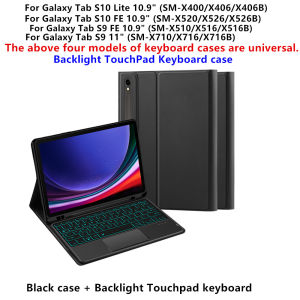
AJIUYU | For Samsung Galaxy Tab S10 Lite 10.9 inch SM X400 X406B Case with Keyboard Stand Cover for Tab S10/S9 FE S10 Lite 10 9 10.9 Case
Suitable for Samsung Galaxy Tablet touch backlight keyboard protectors (can be selected without backlight or without touch)This keyboard protector comes with a pen slot to store your Pencil, allowing you to disassemble the keyboard and use the protector separately. It can support the tablet, making it easy for you to use for work and entertainment!【1】 Method of connecting Bluetooth: Turn on the keyboard switch, press the Fn+C button, and then search for your Tablet Bluetooth connection keyboard.【2】 Open the Android system mode and press Fn+【D】【W】【AND】【for And 】 to access the Galaxy Android system using the touchpad shortcut function.How To Verify Your Tablet Model1.Turn samsung tablet to the back find your specific model,Par exemple: SM -2.Find the "Settings"--Click the "About"--Find the "Model"3.Please select the correct model number for your tablet purchase after viewing it.Compatible Model and Codes:For Samsung Galaxy Tab S10 Lite 10.9 inch 2025 Case (Model:SM-X400 /SM-X406B)For Samsung Galaxy Tab S10 FE 10.9 inch 2025 Case (Model:SM-X520 /SM-X526B)For Samsung Galaxy Tab S9 FE 10.9 inch 2023 Case (Model:SM-X510/SM-X516B/SM-X518/SM-X516)For Samsung Galaxy Tab S9 11 inch 2023 Case (Model:SM-X710/SM-X716B/SM-X718U)Note: The above four models of protective cases are universal.Note: Tablet and Pencil are not included in the packaging!!Attention Please:English versionkeyboard : There are English letters on the keyboard only.Multi-language versionkeyboard : English letters and carved language letters together ..【For example, if you choose French, the keyboard will display English and French letters. Please note that the same letters will not be engraved repeatedly】Due to the material of the white keyboard, the engraved letters are dark gray .(Due to the difference in the number of keyboard keys compared to a normal office keyboard, some special character engraving positions are the same, which is a normal phenomenon)The keyboard Core defaults to English, and the characters engraved on the keyboard are only a Surface display.so in some countries, even if the input method is switched, the special symbols do not necessarily match the keyboard function layout(You can hold down the Shift combination).If you mind, please do not purchase!!.【1】Method to connect Bluetooth: Turn on the keyboard switch, press theFn+Cbutton for about 2-3 seconds, the blue light on the keyboard indicator will flash, and then search for your tablet's Bluetooth connection keyboard.【2】After connecting Bluetooth,Take the samsung tablet as example,open Settings--ystem--Language & input--Add New Keyboard. (For other systems, please set them in the system settings according to the tips of the iPad example.)【3】Input method switching: ctrl+spacebar.(Choose the language you need)【4】Type-C charging interface .【5】For detailed instructions, please read the user manual. If you have any questions, you can contact "Online Services" for consultation .Note: Tablet and Pencil are not included in the packaging~ The video on the main image page is for reference only.Please note that this is suitable for Touch pad or backlight keyboard display layout[Please note that this is for suitable Keyboard display layout without touchpad and backlight

Prime Supply_Play Life
Review

You May Also Like
![[ Samsung Galaxy S25 Ultra ] SUPCASE UB Pro With Built-in Screen Protector and Kickstand](https://img.lazcdn.com/g/ff/kf/S893e7289674c4f6787289053ef53934fy.png_300x300q80.png)
[ Samsung Galaxy S25 Ultra ] SUPCASE UB Pro With Built-in Screen Protector and Kickstand
![[1PC] Encora Waterproof Washing Machine Cover Sarung Mesin Basuh Front Load Top Load PEVA Dustproof Sunscreen Protector](https://img.lazcdn.com/g/ff/kf/S68cb90f2f5f449f1832ca78cf273eb81r.png_300x300q80.png)
[1PC] Encora Waterproof Washing Machine Cover Sarung Mesin Basuh Front Load Top Load PEVA Dustproof Sunscreen Protector
ASUS ZenWiFi BQ16W BE25000 Quad-band WiFi 7 Mesh Router (1 pack) Dual 10G Ports Multi-SSID VPN
Capacitive Compatible Doodle Learning Device Stylus
Samsung A71 Samsung A51 Samsung A41 Samsung A31 Samsung A21s Samsung A21 A11 A01 Hydrogel Screen Protector Matte Privacy Anti Blue Light Hd Clear
PISEN | Replacement Large Capacity Mobile Phone Battery For iQOO Series
For iPhone 5 5C 5S SE 6 6S 7 8 Plus LCD Display Touch Screen Replacement For iphone 7G 7P 8G 8 Plus LCD Screen Tempered Glass
AJAZZ | AJAZZ AF82 Low-Proflie Electrostatic Keyboard 4000mAh Trl-Mode 75% Type-C Display Screen Keyboard Office Gaming E-sport
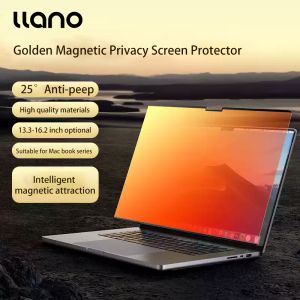
Llano Magnetic Privacy Screen Protector for MacBook Air Pro 13 2020 A2179 A2159 A2337 A2338 Tempered film 13.3-16.2 inch privacy Anti Scratch Laptop Screen protector
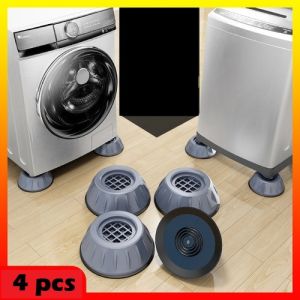
(4 Pcs) Universal Washing Machine / Dryer Base Foot Pad Anti Vibration Anti Shock Multi Purpose Table / Fridge / Cabinet / Rack WFP-4
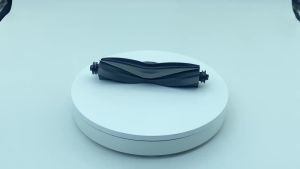
For Dreame X40 Ultra L40 Ultra P50 Pro Ultra P10 Pro Ultra Main Side Brush HEPA Filter Mop Cloths Dust Bag Accessories