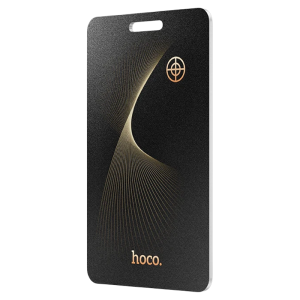
HOCO E92 Smart Tracker for IOS Devices- Universal Anti-Lost Device with Global Positioning Wireless Charging IP68 Waterproof New
HOCO E92 Smart Anti-Lost Tracker Device Model: E92 | Brand: HOCO1. IntroductionThe HOCO E92 Smart Anti-Lost Tracker Device is an ultra-thin, card-type intelligent positioning device designed to help you keep track of your valuables. Utilizing the Apple Find My network, it offers global positioning, lost notifications, and an anti-tracking mode. Its wireless charging capability and IP68 waterproof rating ensure convenience and durability.2. Key FeaturesGlobal Positioning: Track your items anywhere using the Apple Find My network.Wireless Charging: Conveniently recharge the built-in lithium battery.Lost Notification: Receive automatic alerts when the device is separated from your connected phone.IP68 Waterproof: Integrated cold-pressed card design provides water and dust resistance.Anti-tracking Mode: Your phone will notify you if an unknown anti-lost device is tracking you.Ultra-thin Design: Compact card type, easy to carry in wallets, bags, or attach to items.3. SpecificationsModel Number: E92Brand Name: HOCOMaterial: ABSSize: 85.5mm * 54mm * 1.6mmWeight: 12.2gBattery: 110mAh/3.7V pouch lithium batteryEndurance: 2-3 monthsWaterproof Rating: IP68Operating Language: EnglishCompatibility: For iPhone SE, iPhone 6s or later (iOS 14.5+), iPad Pro / iPadOS 14.5+, iPad (5th generation or later), iPad Air 2 or later, iPad mini 4 or later (iPadOS 14.5+), iPod touch (7th generation).4. Setup Instructions*Power On: The device is typically ready for pairing out of the box.*Open Find My App: On your compatible Apple device, open the pre-installed 'Find My' application.*Add Item: Navigate to the 'Items' tab and select 'Add Item'.*Connect Device: Follow the on-screen prompts to connect the HOCO E92. The device is designed for one-click binding.Name and Customize: Assign a name and an emoji to your HOCO E92 for easy identification.Reconnecting to a New Device: If you need to connect the HOCO E92 to a different Apple device, press and hold the restart button on the tracker until you hear a long beep. This indicates it's ready for a new pairing.5. Operating InstructionsFinding Your ItemPlay Sound: In the 'Find My' app, select your HOCO E92 device and tap 'Play Sound'. The anti-lost device will emit a sound to help you locate it quickly. For the sound feature to work, the anti-lost device and your mobile phone should be within approximately 3 meters and barrier-free.Global Positioning: View the current or last known location of your HOCO E92 on the map within the 'Find My' app at any time.Lost NotificationWhen the HOCO E92 leaves a certain distance from your connected Apple device, the system will automatically pop up a 'lost' notification on your phone, indicating that the item is no longer detected near you and showing its last seen location.Anti-tracking ModeIf an anti-lost device that does not belong to you follows you for a prolonged period, your phone will send a message to remind you, helping to prevent illegal tracking.6. MaintenanceChargingThe HOCO E92 features a built-in high-performance lithium battery that supports wireless charging. Place the device on a compatible wireless charger. A full charge takes approximately 2 hours and provides an endurance of 2-3 months.7. TroubleshootingDevice not connecting: If the device fails to connect, ensure it is charged. If it was previously paired with another device, press and hold the restart button on the tracker until you hear a long beep to reset it for a new pairing.'Play Sound' feature not working: Ensure your HOCO E92 and your Apple device are within approximately 3 meters of each other and there are no significant physical barriers between them. The sound feature has a limited local range.No 'Lost Notification': Check that your Apple device's Bluetooth is enabled and the 'Find My' app has the necessary location permissions. Ensure the device is properly paired.Concern about tracking range: The 'Play Sound' feature has a short, local range (within 3 meters barrier-free). However, the global positioning feature relies on the Apple Find My network, allowing you to locate your item over much larger distances as long as it is within range of another Apple device on the network.

HOCO NOAI ENTERPRISE
Review

You May Also Like
New Smartwatch For Men Women Bluetooth Call Heart Rate Sleep Monitoring Weather Information Reminder Sports Fitness Watches 智能手表

Suunto Run 46mm - AMOLED Touchscreen Lightweight sports watch designed for runners
![[NEW] Garmin Forerunner 970 - Premium GPS Running and Triathlon Smartwatch with AMOLED Display](https://img.lazcdn.com/g/ff/kf/Sfa634e9ce5b442a79d2db2c183c20639d.png_300x300q80.png)
[NEW] Garmin Forerunner 970 - Premium GPS Running and Triathlon Smartwatch with AMOLED Display
MOES | MOES Tuya ZigBee Smart Sound and Light Siren Sensor 90dB Smart Life Siren Home Security System Tuya Gateway Hub Used With Alexa
(HD1)Bluetooth Call Smart Watch for Women Waterproof Fashion Timepiece – Fresh Look 2026 Jam Pintar Panggilan Bluetooth untuk Wanita Fesyen Tahan Air – Gaya Segar 2026
LIGE | Luxury Ultra-thin Women Smartwatch 1.43" AMOLED Display Bluetooth Call Health Tracker Waterproof Bluetooth Smart Watch for Men
FONKEN Smart IR Remote Controller Type-C/iOS Infrared Emitter with Phone App Control Mini Adapter for Smartphone TV AC Devices

LIGE | LIGE New Ultra Thin Smart Watch Men 1.96" AMOLED 368*448 Display Always Show Time Bluetooth Call Smartwatch Lady For Android ios
LIGE | 2026 GPS Smart Watch Offline Map Real-time Route Navigation Clock Man IP68 Waterproof Outdoor Military Watch For Men Smartwatch
2026Kids Smart Watch Boys Girls Sport Children Smartwatch Digital Led Waterproof Jam Tangan Budak Perempuan Lelaki Jam Kanak Kanak Berlampu
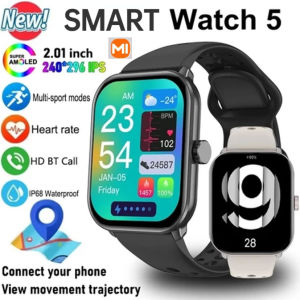
X1AOM1 Watch 5 Men Women HD AMOLED Display Heart Rate Bluetooth Call GPS Track Waterproof Sports Smart Watch