


Switch 2 Smart Cooling Fan with Temperature Display Auto-Speed Turbo Fan for Nintendo Switch 2 Console Type-C Cooler

Switch 2 Smart Cooling Fan with Temperature Display Auto-Speed Turbo Fan for Nintendo Switch 2 Console Type-C Cooler
【Description】
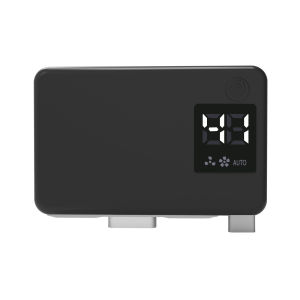
Switch 2 Smart Cooling Fan with Temperature Display – Type-C Plug-in Turbo Cooler for Nintendo Switch 2 Console
Keep your Nintendo Switch 2 console cool during long gaming sessions. This smart cooling fan plugs directly into the top Type-C port of your Switch 2 console and features a built-in temperature sensor, LED display, and 3-speed adjustable turbo fan. Whether you're playing demanding AAA games or charging while playing, this compact cooler helps maintain optimal performance and extend your console's lifespan.
Key Features:
Dedicated for Switch 2 Console – Precision-designed to fit the Nintendo Switch 2. Plugs securely into the top Type-C port. NOT compatible with the original Switch / Switch OLED / Switch Lite.


Smart Temperature Control – Built-in sensor detects the temperature at the console's air outlet. The fan automatically adjusts speed based on heat, or you can switch to manual mode for full control.


3 Speed Levels + AUTO Mode – Touch the control button to cycle through 3 fan speeds (low / medium / high). The LED fan icon grows from small to large. AUTO mode lets the fan self-adjust. Press once more to turn off.


Real-Time LED Temperature Display – The built-in screen shows the current outlet temperature at a glance, so you can monitor your console's thermal status in real time.


High-Speed Turbine Fan – Powerful internal turbo fan delivers strong airflow to effectively dissipate heat, reduce lag, and improve console stability and longevity.


Type-C Plug-In Power – No extra batteries or charging cable needed. The cooler draws power directly from the Switch 2 console via the Type-C port.


Touch Control Button – One-button touch control makes switching between modes and speeds fast and intuitive.


Compact & Lightweight – Low-profile design sits neatly on top of the console without blocking the screen, buttons, or ports.
Specifications:
Material: ABS Plastic


Compatible Model: Nintendo Switch 2 ONLY


Power Supply: Type-C Plug-In (direct from console)


Control: Touch button


Modes: 3 Speed Levels + AUTO Mode


Display: LED Temperature Display


Cooling Method: High-Speed Turbine Fan


Net Weight: Approx. 40g


Color: Black
Package Included:
1 × Switch 2 Smart Cooling Fan


1 × User Manual
Note: Nintendo Switch 2 Console is NOT included.
Notes & Precautions】
For Switch 2 Console Only – This cooling fan is designed exclusively for the Nintendo Switch 2 console. It is NOT compatible with the original Switch, Switch OLED, or Switch Lite. Please confirm your console model before purchase.


Power Source – The fan is powered by the Switch 2 console via the Type-C port. It does not have its own battery. Slight console battery drain during use is normal.


Do Not Block Air Vents – Make sure the fan is correctly aligned and does not block the console's built-in air vents or heat dissipation channels.


First Use – Before turning on, insert the fan gently into the top Type-C port of the console. Do not force the connector. The display should light up once connected.


Touch Button Operation – Press the touch button to switch between 3 manual speed levels and AUTO mode. The fan icon on the display grows from small to large. Press again after AUTO mode to turn the fan off.


Temperature Display Reference Only – The LED temperature reading is for reference and monitors the air outlet area. It may differ slightly from the console's internal temperature sensor.


Avoid Moisture and Dust – Keep the fan away from water, drinks, and dusty environments. Do not insert objects into the fan blades.


Safe Removal – Power off the console or fan before removing the cooler. Gently pull the fan straight out from the Type-C port. Do not twist or yank sideways.


Children Supervision – This product contains small parts and a rotating fan. Not suitable for children under 6 years old. Adult supervision is recommended.


Temperature Range – Operate and store between -10°C and 50°C. Avoid prolonged exposure to direct sunlight or high-temperature environments.

GlobalTechMart
Seller ratings 97%
Review

Oops
This video has no reviews.
You May Also Like
00:12
Infinix Smart 8 8 Pro 9 10 Plus Hot 30 30i 40 40 pro 40i 50 50i Solid Cute Sweet Capybara Bear Beige Black Soft Phone Case 卡皮巴拉水豚手机壳

00:20
Replacement for Switch Joypad Gamepad L R LR Slide Left Right Sliders Railway Rail for Joypad Controller Track Slider
00:15
BASIX | Mini Wireless Lavalier Microphone for iPhone Android with Noise Cancellation Portable Wireless Mic for Video Recording Interview
00:33
RQZN | Rotatable Magnetic Card Holder Phone Stand Orange
00:13
SECOP COMPRESSOR - SC18G / R134
00:44
For iPad 10 10th 10.9 | 11th 11 inch A16 Transparent Airbag Tab Tpu Back Cover Case Pen Slot Holder
00:41
Essager 5.3 Bluetooth Adapters Mini Multifunctional Support Free Drive Windows 8.1/10/11 Compatible With Mouse/Keyboard/Gamepad/Speaker/Headset Bluetooth Adapter For MobiIe Phone Tablet Laptop Desktop PC Bluetooth 5.3 Adapters

00:55
Universal Roller Automatik Washing Machine Pad Adjustable Height Washing Machine Anti Vibration Pad Non-Slip Anti Pad Fridge Base Feet

00:15
BASIX | Wireless Lavalier Microphone Mini Audio Video Recording Mic for iPhone Android Live Broadcast Gaming - Compact Receiver Included

00:17
Nisi | Low Color Shift Long Exposure Square ND Filter 100mm

00:34
TELESIN 170cm Phone Tripod Selfie Stick Wireless Bluetooth Remote Screen Monitor
00:20
Ultra Thin Transparent Soft TPU Case for IPhone 17 Air 14 15 16e Pro MAX Plus SE Full Protect Clear Silicone Back Covers Phone Cases
Hot Search
UGREEN Accessories Storage Bag Box Charger Charging Headset Mouse Accessories Storage Bag Large Capacity Travel Portable Bag Power Bag Suitable for book Computervalorant esportMen s Hiking Shoes Best Pricelike a wolf dog food 20kgUnisex Elasticated Waist Plain Slack Pants S-10XLsquare frame glasses non prescriptionboss baby cupcake cakepanasonic car battery ns40zlmesin packing beg plastikakelic boardgan charger 150wsgt foodacrylic display cubemx5 ndnippon paint apple white 474










