IRIN | IN‑70 5.8G Guitar Wireless System Rechargeable Transmitter Receiver Zero Delay Anti‑Interference Audio Kit for Band Rehearsal
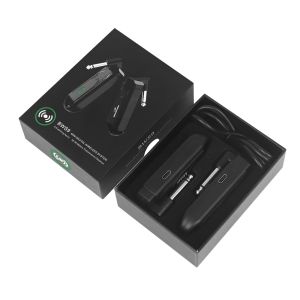
IN‑70 5.8G Guitar Wireless System Rechargeable Transmitter Receiver Zero Delay Anti‑Interference Audio Kit for Band RehearsalWireless system:This is a mini wireless transceiver system for 6.35mm audio interface equipment, with strong anti-interference ability, strong penetration of obstacles, stable transmission without lagging and other advantages In order to avoid signal attenuation, the wireless system should be as close as possible to the performance area, and with large metal objects, walls, scaffolding and other objects to maintain a distance of at least 1.5 meters, and try to ensure that there is open signal between the transmitter and receiver direct path. Before the performance, please check carefully whether the battery power is sufficient to avoid being unable to use because of insufficient power.SpecificationChannels: 10channelsReception sensitivity: Signal-to-noise ratio: >85dBDelay: System frequency response: 20~20KHzDistortion:<0.05%Transmission distance: 30~50mFull power working time: 5~6 hours (varies by environment)Package contents:1 * Receiving end1 * Transmitter1 * USB1 * Instruction manualPower check:When the device is on, double-click the front button, then the indicator above shows the current power information and goes out after 3 seconds.Device charging: 1:1. The device uses a lithium polymer battery, you need to charge the device before using it, and if it is not used for a long time, charge the product once every three months to activate it.2. The device is equipped with a USB charging cable, which can charge the transmitter and receiver, please use a 5V2A charger for charging.Equipment on/off: 1:1. Power on: Press and hold the button for 2 seconds when the transmitter and receiver are off, the green ring indicator will be on, the device is successfully powered on and enters the normal working state.2. Shutdown: Press and hold the button for 2 seconds when the transmitter and receiver are on, the ring indicator will be off and the device will be shutdown successfully.3. After power on, the green light of the circular indicator at the transmitting end is always on, and the green light of the circular indicator at the receiving end is flashing, indicating that the device is not yet connected normally.Equipment test:The transmitter into the guitar, the receiver into the audio, the transmitter and receiver long press the power on button, the transmitter and receiver side green light is always on then enter the work state, the following situation according to the following way to solve:1. not matched successfully: If the transmitter green light is always on and the receiver green light blinking to prove that not matched successfully, you can re-operation of the device on and off, or re-pairing to the code.2. Matching success without sound: If there is no sound when the green light is always on at the transmitter and receiver, try to re-pair the product to the code.3. Frequency hopping: If there is interference in the audio during use, it is possible that there is a near signal working around, you can directly short press the frequency hopping button on the transmitting end to hop the frequency.Multi-pair simultaneous use:Wireless equipment system can be used 10 sets of equipment at the same time without interference (30 square), in order to avoid signal crossover, please power on and test the wireless transceiver pair by pair. After each pair of wireless transceiver test is completed then the next pair of wireless transceiver is powered on and tested. If signal interference is found during the test, you can rotate the frequency hopping key for frequency hopping.1 pair of multi-function:A wireless system transmitter can be used with dozens of wireless system receivers.Equipment debugging: After turning off all other near wireless devices, use a thin wire to long press the receiver end of the four receiver devices to the code button until the red light at the receiver end flashes and then release the button. Then use the thin wire to long press a transmitter device code pair button until the red light on the transmitter side flashes and then release the button, when all receivers are flashing green. Press the button on the transmitter side again, and when the green light is always on at the transmitter side and all the receivers, the four receivers can accept the signal from one transmitter side, which can realize the one-to-many function.IRIN IN-70 Electric Guitar Wireless Transmitter Receiver Guitar Audio Wireless Transceiver System Guitar Parts Accessories Black

Prime Supply_Play Life
Review

You May Also Like

Word Power Made Easy By Norman Lewis

tongue drum 6 inches high pitch空灵鼓6寸礼盒鼓

Disney Stitch Spring Fever Picture Story Book Easy To Read For Kids
BESTIT Key of C 10 Hole Harmonica with Box Metal Mouth Organ Portable Rectangle Beginners Educational Toys Gifts Children

IRIN | IRIN Drums Bubble Nail Cowhide Tambourine Three Sets Cowhide Tambourine Stimulate Interest Orff Instruments Musical Drums

IRIN | SLADE Flute Sheet Music Stand Portable Marching Sheet Music Stand High Performance Springs Beginners Practice Flutes Accessories

Disney Brave Twisted Tale Fate Be Changed Novel By Farrah Rochon With 464 Pages

Buku Cerita Haiwan Comel Untuk Kanak-kanak Taska Tadika Prasekolah - Shape Book Bedtime Story For Kids

IRIN | IRIN Orff Shaker Sand Hammer Rattles Percussion Instrument for KTV Party Entertainment Wooden Maracas Kids Educational Tools

IRIN | 1/3/5/10Pcs Drum Set T-Shaped Key Silicone Protective Cover T-shaped Wrench Non-Slip Wrench Kirsite Percussion Instruments Parts

【 全18卷】山海经正版全集无删减 图解山海经彩图版全解珍藏版经